 More website visits
AI agent to AI agent protocol
AI-Search Discovery Convert ChatGPT and Gemini searches into direct conversations with MAIIA agent, answering directly to any inquiry.- Increase AI search visibility
- Drive traffic from AI search
Component library & visual QA. Removed before deploy.
Dark persona / demo card surfaces. Tokens: --color-secondary-indigo · slate · teal-muted
Charcoal / sage surfaces + soft-stage orange & sand. Gold label uses existing --color-gold-deep (#b59352).
Soft-stage supporting blues (feature-evaluation arc)
Buttons
Primary (gold gradient), Secondary (1px stroke), Flat amber (white bg only), Text link
Flat · --color-flat-amber #efc16b · no shadow/gradient · white backgrounds
Icon Buttons
44px default / 36px small — gold (light bg), navy (light bg), ghost (dark bg)
Icon Buttons on Dark
Buttons on Dark
Separators
Reusable `DarkFold` for transitions between page sections. Landing sections may use their own in-flow spacing only — do not restyle `DarkFold` to match a one-off pattern.
↑ Gold line separator (`DarkFold` line) ↑
Content fold
Dark fold with content — used between white sections for trust signals and transition messaging.
Cards
Rounded (20px), shadow-only (no border), line icons, generous padding
Checkmark Cards
Component: CheckmarkCard.astro · live: /platform/guest-app #capabilities (6-up + sequential chip wave). Gold hover stroke · blue glow · chips inactive → gold · gold ghost CTA.
Pre-Arrival Sales
Website AI Sales Agent Turns guest questions into bookings, upgrades, and pre-arrival sales.In-Stay Experience
Guest AI Companion Personalizes the stay and helps guests discover, plan, and book more.Commercial Control
AI Control Center Shows your team what guests view, click, and book — and helps improve performance.
Activate checkmarks programmatically by adding ck-item--gold or ck-item--active class to .ck-item elements.
Homepage-new
Frosted glass KPI chips. Orange glow = Hero floating facts. Blue glow = WhyMaiia stat grid. Component: BlurStatCard.astro
glow="orange"
glow="blue"
glow="blue"
Blue variant — 3×2 grid (WhyMaiia layout)
Proof
Rounded navy KPI band — gold values, muted captions, vertical dividers. Component: NavyMetricsStrip.astro · live: /platform/hospitality-ai-suite #proof
Homepage-new
Gold-gradient check disc + uppercase label strip. Component: PillarsStrip.astro (homepage-new)
Homepage-new
Photo-header channel card with white pill tag, gold chips, ghost CTA. Component: PictureAppCard.astro · live: VideoShowcaseIntro
More website visits Homepage-new
Filled navy disc + white chevron. Distinct from IconButton (stroked). Component: CarouselArrow.astro · live: ProofSectionA side arrows
Hover expands the light-blue halo (desktop proof carousel behavior).
Homepage-new
White disc, light gray ring, navy line arrow + n / total. Live on ProofSectionA desktop pager (.proof-nav-btn). Components: CarouselNavOutline.astro · CarouselPager.astro
Homepage-new
Copper check + bold title + em-dash + muted description. Component: QuickFactCheckmark.astro · live: WhyMaiia
Increase AI search visibility — Show up when travelers ask ChatGPT and Gemini.
Reduce OTA dependency — Drive more direct bookings through AI-powered conversations.
Automate repetitive queries — Free your staff to focus on what only humans can do.
Callouts
Cream band + left gold bar. Bold lead + regular body. Light/white backgrounds. Component: QuickFactBand.astro
Homepage-new
White process chain with orange eyebrows and chevron connectors. Settled look here; scroll appear animation stays in ProofSectionA. Component: OrderAppearCards.astro
MAIIA A2A
from AI assistants
Website Sales Agent
and upsells on your website
Concierge Guest app
hyper-personalized upsells, no install
Homepage-new
Brass check disc + title + desc. Distinct from CheckmarkCard (no chips / ghost CTA). Component: ValueBandCheckCard.astro · live: ValueBandLobby
The Website AI Sales Agent helps guests find the right room faster and sends them to the right reservation path.
MAIIA promotes upgrades, wellness, dining, tours, and destination experiences before arrival and during the stay.
Automated content scraping keeps hotel knowledge current, while simulation-based QA stress-tests the AI before guests do.
Homepage-new / Suite
ValueBandLobby chrome + FIC-style brass icon cards (gold bar, brass icons). Full-bleed section. Component: LobbyIconGainBand.astro · live: /platform/hospitality-ai-suite #outcomes
What the hotel gains
Design-system demo — same band as the Hospitality AI Suite outcomes section.
Bring travelers from AI discovery to the hotel’s own website and existing booking system.
Sell dining, wellness, transfers, tours, events and packages before arrival and during the stay.
Handle repetitive questions 24/7 and escalate complex requests with a summary.
Adapt recommendations to language, interests, trip purpose and stage of stay.
Ground every channel in approved knowledge and test weak information before guests find it.
See what guests asked, what MAIIA showed, and what happened next.
Homepage-new / Suite
WhatsNext / scr2 stroke checks + hairline row separators. Variants: on-navy · on-white. Component: GoldCheckList.astro · live: hospitality-ai-suite #full-offer / #one-ai-brain / #languages
on-navy
on-white
Homepage-new
Flat navy + blue ambient shadow (WhatsNext / FinalCta / HotelSafeAI). Components: NavyAmbientBand.astro · FinalCtaBlock.astro
Homepage-new
Button + Limited offer microcopy. discovery = brass + purple glow; hero = secondary-dark + cyan hover. Component: AssessmentCta.astro
Limited offer
variant="discovery"
Limited offer
variant="hero" (hover for Limited offer)
Homepage-new
Negative pain-point list (inverse of checkmarks) and full photo-scene assessment band. Components: GapListX.astro · AssessmentCtaCard.astro · live: AI Discovery
Homepage-new
OpenAI / Gemini / Perplexity cluster. Existing Vue component — now catalogued. DiscoveryPlatformLogos.vue
Homepage-new
Active (navy) / inactive (white) with ghost cue + progress bar. Component: ProofUseCaseCard.astro · live: ProofSectionA
Homepage-new
Footer icon row with hover tooltips (ChatGPT / Gemini / Claude sample). Component: IntegrationLogoRow.astro · live: VSI card footers
Homepage-new
Edge-faded infinite partner logo ribbon. Component: LogoRibbon.astro (homepage-new)
made by hotels - for hotels, with ❤️

Process patterns
Stacked white cards with dual colored side bars. Stage navy → blue → mist → orange. Component: ProcessSideBarCards.astro
Select the core requirements that guide feature evaluation across all product options
Gather reliable information on product specifications, usability, and performance
Compare feature sets to measure how well each option meets expectations
Summarize strengths and weaknesses to support informed product selection
Process patterns
Hex icon cards + branch connector rail. Component: ProcessHexCards.astro
Identify the main goals and core purpose for using the product
Pick the option that best matches required features and expectations
Finalize the decision by choosing the feature set with the strongest value
Process patterns
Diagonal stair cards with circular numbered discs + connectors. Default = comparison-post layout. Legacy icon bars: class pss--with-icons. Component: ProcessStairsSteps.astro
Five checks before you trust a hotel chatbot demo or price sheet.
Open the hotel widget in English. Does it sell — or politely refuse?
Family, ages, pet. Does the agent keep context and recommend products?
Look for named room cards with imagery and a booking action — not only a photo.
Phone/email alone is not smart handoff. Ask who receives a translated summary.
Add booking, catalog, resync, branding and hotel time — not only the base tier.
Process patterns
Traditional vs Digital dual lists with segmented color rail + numbered discs. Component: CombinedProcessCards.astro
Relies heavily on paper-based or physical activities.
Information is delayed with longer response times.
Operational costs increase due to inefficiencies.
Data is restricted to physical locations.
Processes are difficult to adjust quickly.
Reduces errors through system-driven efficiency.
Delivers instant updates for quicker decisions.
Operational spend drops as routine work automates.
Enables secure data sharing anytime, anywhere.
Supports quick and efficient adaptations to sudden change.
Process patterns
Hub circle + arc of numbered stage icons. Component: ConnectedStepsCircle.astro
Five levels to measure product features
Check it against core requirements and guest journey moments.
Evaluate booking, upsell, and staff-time impact.
Ship the capability into production workflows.
Process patterns
Three-step funnel: discovery logos → handoff arrow → site + booking check. Scroll entrance stagger; step 03 active (navy). Component: A2aHandshake.astro
End-to-end sales funnel
MAIIA's Agent-to-Agent (A2A) protocol lets AI assistants quote your property accurately, then hand the visitor over to your sales agent on your own domain.
Travelers ask ChatGPT, Gemini, or Perplexity for the right place to stay. MAIIA keeps those answers aligned with your CMS — so the visitor sees an accurate picture of your property, not a guess.
Instead of losing the visitor to a third-party booking funnel, the assistant hands them to your sales agent, with the context already loaded. The thread doesn’t restart on your homepage — it continues.
On your own website, the agent picks up where the AI left off, recommends the right room and the right add-ons, and drives the visitor straight into your existing booking engine.
Process patterns
Vision / Mission / Highlights. Accents from secondary scheme (orange, stage-navy, stage-blue). Component: FeaturedIconCards.astro
Create accessible and efficient solutions for modern consumers.
Blog · comparison posts
Long-form competitor posts use ComparisonPostLayout.astro — not CompetitorCompareLayout. Canonical page: maiiaconcierge-vs-chatislav-comparison-post.astro · Agent doc: COMPARISON-POST-INSTRUCTIONS.md
Comparison post typography
Apply these classes in compare post markup — do not invent new font sizes or colors in page files.
Full agent doc: COMPARISON-POST-INSTRUCTIONS.md §8.
| Token | Resolved | Usage |
|---|---|---|
--cmp-ink | #00213a | Headings, bold leads, table body emphasis |
--cmp-body | rgba(0,33,58,0.82) | Default prose, hero card body on light panels |
--cmp-muted | rgba(0,33,58,0.62) | Captions, nav vendor, figure figcaption |
--cmp-gold | #ceaa70 | Borders, accents, table stars |
--gradient-brass | 315° gold gradient | .cmp-post__title-accent, .cmp-post__stat strong (clip text) |
--cmp-navy-header | #00213a → #031426 | Hero, verdict, case, stat bands |
--cmp-line | rgba(0,33,58,0.1) | Card borders, figure frame |
--cmp-soft | #f7f9fb | Quick / decision card fill |
| Role | Class / selector | Size | Weight | Color | Notes |
|---|---|---|---|---|---|
| Hero title | .cmp-post__title | clamp(2.15rem, 5vw, 3.75rem) | 700 | #fff | Max ~22ch; accent span uses brass gradient |
| Hero title accent | .cmp-post__title-accent | inherit | 700 | --gradient-brass clip | Not solid amber |
| Hero dek | .cmp-post__dek | clamp(1.05rem, 2vw, 1.35rem) | 600 | rgba(255,255,255,0.92) | White subline — not brass |
| Hero meta | .cmp-post__meta | 13px | 400 / b 700 | 55% / 92% white | Published date, read time |
| Eyebrow / kicker | .cmp-post__kicker | 11px | 600 | #b77227 | 4px letter-spacing · uppercase |
| Hero kicker (mobile) | .cmp-post__hero .cmp-post__kicker | 12px | 600 | #b77227 | <768px on long hero eyebrows |
| Intro punchline | h2.cmp-post__h2-lg | 2rem | 700 | --cmp-ink | Under “The short answer” kicker |
| Section h2 | .cmp-post__section-head h2 | 1.7rem | 700 | --cmp-ink | margin-top: 0; ~56px above unit |
| Orphan h2 (avoid) | .cmp-post h2 | clamp(1.65rem, 3vw, 2.25rem) | 700 | --cmp-ink | Prefer .cmp-post__section-head |
| Fixed mid h2 | h2.cmp-post__h2-md | 1.7rem | 700 | --cmp-ink | Opt-in when scaling h2 is too large |
| Body default | .cmp-post p | 16px / 1.7 | 400 | --cmp-body (via line-height on root) | 18px bottom margin |
| Intro quiet body | .cmp-post__intro--quiet > p | 16px / 1.7 | 400 | body-copy-ink | strong → heading navy 700 |
| Intro lead (legacy) | .cmp-post__intro p:first-of-type | 1.25rem | 500 | --cmp-ink | Non-quiet intros only |
| Lead paragraph | .cmp-post__lead | 1.125rem | 500 | --cmp-ink | Opt-in emphasis block |
| Subsection h3 | .cmp-post h3 | 1.05rem | 700 | #00213a | Quick cards, proof signal copy |
| Evidence quote | .cmp-post__quote | clamp(1.35rem, 2.5vw, 1.85rem) | 700 | --cmp-ink; em amber | Brass highlight via <em> |
| Signal copy h3 | .cmp-post__signal-copy h3 | 1.125rem | 700 | --cmp-ink | MAIIA proof row heading |
| QuickFactBand | .cmp-post__intro--quiet .qfb__text | 1rem / 1.7 | lead 700 | heading + body-ink | Component: QuickFactBand.astro |
| FeaturedIconCards body | .fic-card__body | 16px / 1.6 | 400 | #00213a | All --solo, --row, default |
| FIC list (row variant) | .fic-card__list | 1.05rem | inherit | #00213a | Takeaways bullets |
| Verdict band | .cmp-post__verdict | clamp(1.05rem, 2vw, 1.35rem) | 600 | #fff; em amber | Navy header background |
| Notice card | ComparisonNoticeCard | 1.05rem | 500 | --cmp-ink | scr2 shell; bold inline lead — replaces cream `.cmp-post__callout` |
| Callout (legacy) | .cmp-post__callout | 1.05rem | 500 | --cmp-ink | Cream panel — migrate to notice card |
| Callout guardrail | .cmp-post__callout--guardrail | 1rem | 400 | --cmp-body | Limitation / disclaimer tone |
| Hero platform card title | .cmp-post__hero-card strong | 1.05rem | 700 | #fff | Dual cards under dek |
| Hero platform card body | .cmp-post__hero-card p | 0.9375rem | 400 | rgba(255,255,255,0.72) | Line-height 1.55 |
| Figure caption | .cmp-post__figure figcaption | 0.8125rem | 400 | --cmp-muted | Observed date + inference note |
| Step number | .cmp-post__step::before | 14px | 700 | Disc fill: stage-navy → sand (matches ProcessStairsSteps) | Auto 01–05 via CSS counter · 36px disc |
| Step label | .cmp-post__step | 16px | 700 | #00213a | ComparisonStepCards — horizontal scr1 row |
| Stat metric | .cmp-post__stat strong | clamp(2rem, 4vw, 2.65rem) | 800 | #efc16b | ComparisonStatCards metric — matches pill |
| Stat pill accent | ComparisonStatCards ::before | — | — | #efc16b | Same sand as metric numbers |
| Notice accent (sand) | fic-cards--notice-sand | — | — | #efc16b | Bold-lead fairness notices — default |
| Notice accent (blue) | fic-cards--notice-blue | — | — | #004b70 | Informational plain callouts |
| Stat label | ComparisonStatCards label | 1.05rem | 500 | --cmp-ink | scr2 body — white card, shadow, left pill accent |
| Case hero number | .cmp-post__case .cmp-post__big | clamp(3rem, 8vw, 4.75rem) | 700 | #fff | Commercial example band |
| Sidebar menu heading | .cmp-post__kicker.cmp-post__sidebar-label | 11px · 4px ls | 600 | #00213a (not amber) | Inherits kicker scale; line-height: 1.4; 12px left inset |
| Nav link title | .cmp-post__nav-title | 0.875rem | 700 | --cmp-ink | Series sidebar |
| Nav vendor | .cmp-post__nav-vendor | 0.75rem | 400 | --cmp-muted | Under short title |
| Compare table th | .cmp-post__table th | 14px | 700 | --cmp-ink | ComparisonPostTableStyles |
| Compare table td | .cmp-post__table td | 14px | 400 | --cmp-ink / subheadline | LabelBadge cells inherit component |
| Table legend | .cmp-post__table-legend | 12px | 400 | subheadline | ComparisonTableLegend.astro |
| FAQ answer | .cmp-post__faq details p | 0.9375rem | 400 | inherit | Native <details> |
| Methodology | .cmp-post__method | 0.875rem | 400 | inherit | h2 1.35rem inside |
| Layout CTA title | .cmp-post__cta-title | 1.35rem | 700 | --cmp-ink | Injected by ComparisonPostLayout |
| Layout CTA lede | .cmp-post__cta-lede | 1rem | 400 | --cmp-body | Bottom of every compare post |
| Class | Text | Background | Use |
|---|---|---|---|
.cmp-post__tag--observed | #9b540e | #fff0dc | Live-test evidence in tables |
.cmp-post__tag--inference | #40556e | #e8eef5 | Reasoned conclusion |
.cmp-post__tag--public | #0e6a51 | #eef4eb | Public pricing / docs |
.cmp-post__tag--product | #9b540e | #fff0dc | Product-page sourced |
.cmp-post__tag--none | #963a33 | #fbe7e5 | Missing / not demonstrated |
.cmp-post__status--yes | #16866a | — | Table Good · weight 850 |
.cmp-post__status--partial | #a35d0d | — | Table Partial |
.cmp-post__status--missing | #52636c | — | Table Missing / N/A |
.cmp-post__status--observed | #8c342c | — | Table Bad / competitor gap |
.cmp-post__label | --cmp-muted | #eef3f7 | 10px uppercase pill on figures |
.cmp-post__label--maiia | --cmp-navy-rich | gold 20% tint | MAIIA screenshot label |
.cmp-post__label--issue | #8d392e | #f5e0dc | Competitor problem evidence |
.cmp-post__danger h3 | #8f2822 | white card | Intro danger callout title |
| Panel / evidence chrome | — | #f4f5f8 | .cmp-post__ds-block--panel, .cmp-post__evidence-band |
| Quote / verdict highlight | #b77227 | — | <em> inside .cmp-post__quote or .cmp-post__verdict |
.cmp-post__section-head (or orphan kicker → h2).cmp-post__section-head.cmp-post__intro--quiet
Table A · buyer comparison (cmp-post__table--compare)
Category winner is marked with in the MAIIA column.
| Website-sales criterion | Competitor | MAIIA WSA |
|---|---|---|
| Natural-language Q&A | Confirmed Both installations understood ordinary questions. | Confirmed Natural conversation connected to structured products and actions. |
| Multilingual sales | Partial — deployment can block languages English understood; one site refused to serve the guest in it. | Consistent multilingual layer Hotel-selected languages apply to conversation, recommendations and cards. |
| Room recommendation | Partial — textual category Described apartment size and amenities in text only. | Product-level recommendation Shows concrete suitable rooms and explains why each fits. |
Table B · informational / hidden cost (cmp-post__table-shell--inactive +
--stage-nums)
Plain prose cells — numbered rows, MAIIA column highlighted, no stars and no legend.
| Hidden cost | Competitor consequence | MAIIA method |
|---|---|---|
| Hotel implementation | Official pricing includes an undisclosed one-time implementation fee. | Automatic setup is part of the defined 3–7 day process. |
| Knowledge maintenance | Auto-resync is a paid add-on; otherwise stale answers become an operational risk. | Structured hotel knowledge and editing workflow are part of the product architecture. |
| Conversion functions | Booking and catalog are separate paid modules. | Product cards and booking destinations are core WSA behavior. |
Evidence band + picture card (hover zoom · tap lightbox)
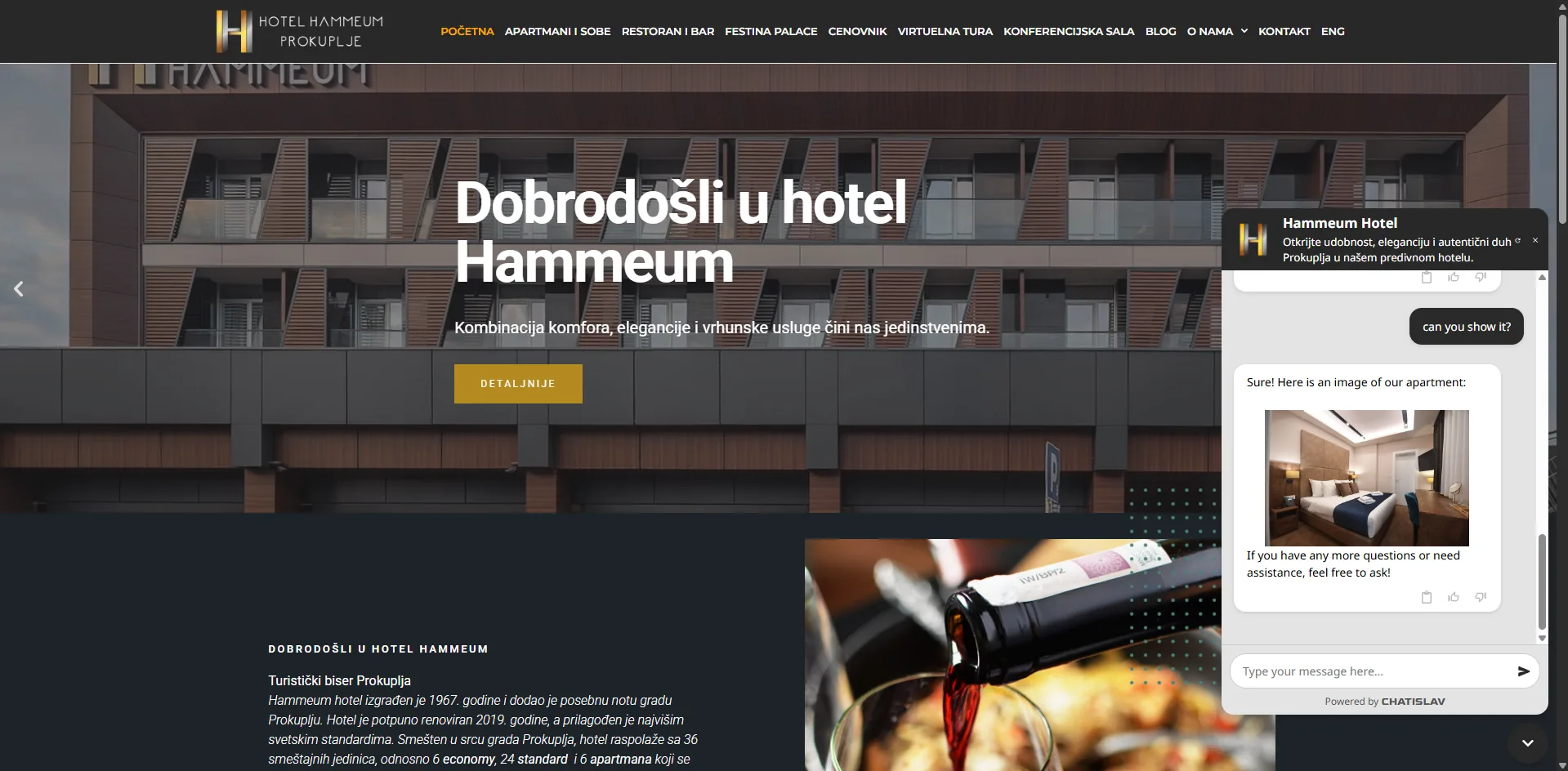
Live evidence · Hotel Hammeum
It could describe the room and show a photo. It never turned that into a sellable product.
Hammeum answered in English, described its two-bedroom apartment and listed capacity and amenities. When asked to show it, the bot returned a real photograph.
The image has no product identity, price, availability, comparison or booking CTA. The guest still has to translate the answer into a buying decision.
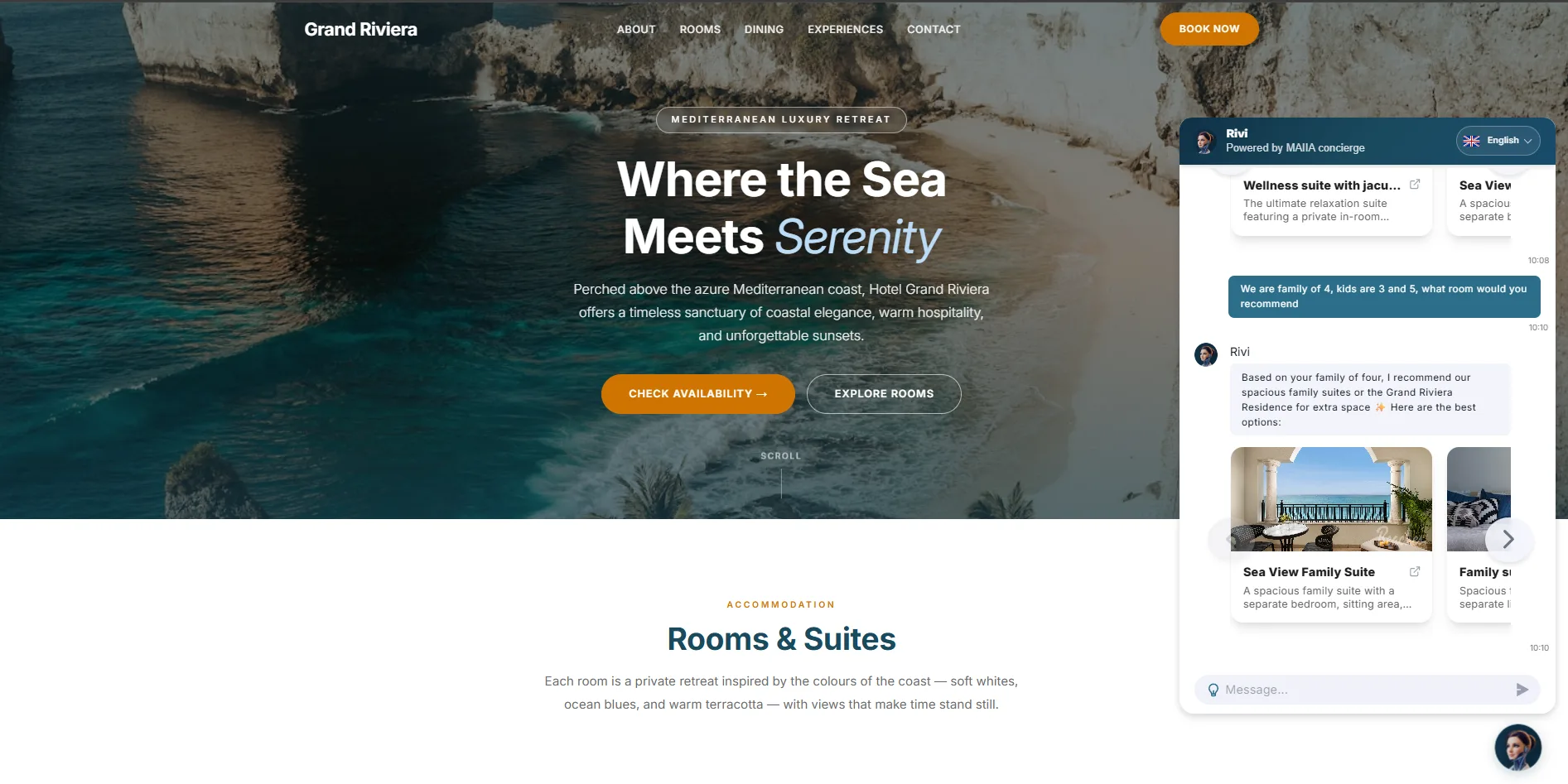
The same conversation becomes a set of visual, translated and actionable options. A room card preserves product identity and sends the guest to the correct booking destination.
Section head preview
The short answer
Intro body at 16px / 1.7 — regular weight, body-copy-ink. Bold lead uses heading navy.
Quick Fact Band
FeaturedIconCards — solo (scr2 · title + body)
16px body text. Title + body card — e.g. Chatislav hidden-cost callout. Not the notice variant.
ComparisonScopeCard — intro scope (scr2 solo · title + date)
Akia is primarily a guest-lifecycle communication and operations platform. MAIIA WSA is designed as a consultative website sales agent—from discovery to a verified commercial action.
ComparisonVerdictCard — mid-article / summary verdict (scr2 solo · title Verdict)
Akia connects guest communication channels. MAIIA connects AI discovery to the hotel’s Website Sales Agent and direct commercial journey.
ComparisonNoticeCard — notice variant (scr2 shell · callout typography)
This matters for a fair comparison. Bold lead and body flow in one paragraph at 1.05rem / 500 — sand variant (default).
ComparisonNoticeCard — blue variant (informational plain callout)
The guest speaks their language. Hotel staff read their own. Conversations can be displayed in the original language or translated into the language selected in the MAIIA CMS.
ComparisonStatCards — metric row (sand #efc16b pill + numbers)
ComparisonDecisionCards — paired decision row (no dates · accent checkmarks)
ComparisonStepCards — scr1 horizontal process row (16px labels · 14px discs · stage palette)
FeaturedIconCards — row (takeaways)
What we observed in live tests.
Where the product blocks revenue.
How WSA handles the same scenario.
Process blocks (stairs, hex, circle) — see sections above. Live reference: MAIIA vs Chatislav
Utilities
1) Cyan CTA — hero / primary button. 2) Orange halo — frosted stat chips. 3) Blue card — CheckmarkCard / ValueBand. Purple is the same card recipe, hue-shifted (VSI). Tokens in global.css.
1 · Cyan CTA
--shadow-glow-cyan
rgba(0, 225, 255, 0.38)
Live: .btn-gold-gradient:hover · utility .cyan-glow
2 · Orange halo
--shadow-glow-orange
Warm stack · mix-blend-mode: screen
Live: BlurStatCard / hero facts · utility .orange-glow
3 · Blue card
Hover this card
.blue-glow
--shadow-glow-blue
rgba(13, 89, 242, 0.5)
Live: CheckmarkCard / ValueBand · sibling .purple-glow
.purple-glow
card sibling · #4e16cb
.cyan-glow
utility on any surface
.orange-glow
utility on any surface
Animation
Transparent ring + white tick; stroke-dash loop (2.8s). Butt line caps to avoid a stray dot. Use on dark/hero. Component file: GlassCheckmarkShowcase.vue.
Badges & Pills
Fully rounded pill shape
Label badges
Status labels for light surfaces. Component: LabelBadge.astro · tone defaults: good→green, bad→red, neutral→slate
Good / Bad with icons · pill
Good / Bad with icons · soft corners
Semantic tones · full round (pill)
Semantic tones · slightly rounded (soft)
Tailwind palette · pill
Tailwind palette · soft corners
Usage: <LabelBadge tone="good" icon> · check / x share stroke-width 2.35 + round caps
Icons
Outline style, not filled. Uses color from variant.
Navy
Gold
Teal
Navy Large
Gold Large
Note: Unicode placeholders — will be replaced with SVG line icons (Lucide/Phosphor) in production
Typography
Canonical light-bg default: amber eyebrow (`--color-eyebrow-on-light` / End-to-end sales funnel) + navy h2 clamp. Tokens: --type-section-* / .maiia-section-eyebrow · .maiia-section-h2.
Left Aligned
Same component with align='left' prop.
On Dark Background
Gold base eyebrow, white heading, muted supporting text.
Interactive
Swipe or use arrows. Cards peek from the edge. Touch-friendly.
Connect every part of your property operations to save time, boost revenue and delight guests.
See all features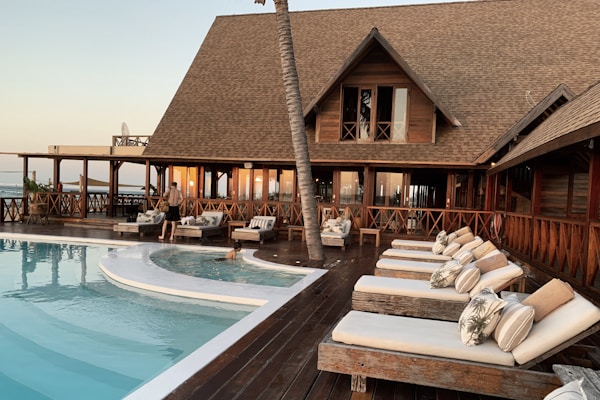
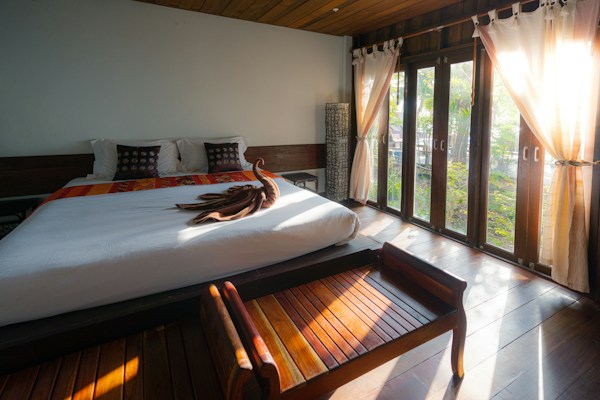


Surface local attractions, tours, and experiences your guests will love.
Learn more→
Interactive
Click a tab to swap content panel. Smooth fade transition.
Because you told it to. The AI follows your margin priorities, your seasonal promotions, your bundling strategy.
Interactive
Left-side navigation cards with icons. Click a card to switch the main content area. Cards follow design system styling.
The Website Sales Agent engages visitors in real-time conversation, follows your sales strategy, and guides them toward booking — in any language, at any hour.
Screenshot placeholderInteractive
Left-side cards with thumbnail images. Click to switch the main hero image. Inspired by advanceboat.com product selector.

Premium suite with panoramic ocean views, private terrace, and butler service. The ultimate expression of coastal luxury.
See detailsInteractive
16:9 video player with autoplay. Cards below switch the video source. Smooth crossfade between clips.
Your website chat widget converts visitors into guests — 24/7, in any language.
Sections
Full-bleed navy gradient, parallax cutout, frosted glass cards, brass metrics, sequential gold stroke on reveal. Optional slot="intro" for a block above the eyebrow (shared parallax). Same pattern as the homepage KPI band; pass your own items for product pages.
Proof strip (sample)
Reservations
+12%
Direct bookings via AI sales agents
Staff time saved
-35%
Repetitive queries handled automatically
Response speed
4x
Versus waiting for front-desk hours
Auto-resolved
90%
Routine questions without human handoff
FAQ
Each item in its own card frame. Generous padding. Gold accent on expand.
MAIIA is an AI concierge ecosystem for modern hotels — Website Sales Agent, Guest App, and AI Control Center with agentic intelligence that follows your hotel's sales strategy, not generic chatbot responses.
Most hotels go live within one week. Our AI autonomously researches and structures your hotel content, destination attractions, and menu offerings — so you don't start from scratch.
See onboarding →Yes. MAIIA is booking-system agnostic — it works with any reservation system through article booking links. Guests click through to your existing booking page.
MAIIA supports 7+ languages with native-quality responses. Your AI concierge speaks your guest's language, regardless of which language your content was originally written in.
Type Scale
The AI concierge ecosystem
Three connected apps where your AI agents sell rooms, guide guests, and deepen every visit — while you see every conversation, set every strategy, and validate every answer.
Each app serves a different moment in the guest journey — from the first website visit to the last night of the stay.
Animation player bar
Play / pause / restart + scrubbable timeline for timed marketing animations. Pair with AnimMount in split rows (copy column = controls, visual column = animation).
Website Sales Agent (embed)
Launcher + chat panel + in-widget flows — aligned with the live widget. New marketing animations are full duplicates of the template component; see the design-system doc for the canonical file and checklist.
CMS mock (dashboard)
Conversation spotlight scale, stacking tokens (--cms-conv-spotlight-*), and
the cms-conversations animation duplicate — documented on the canonical DS page.
Phone Mockup Chat
Animated guest-app conversation with spotlight pop, carousel interaction, and dark overlay. Cloned per use case from a master template.